Getting Started with Express: Bringing Greenfield Community Center Online
## 1. Problem Statement
## **A Day at “Greenfield Community Center”**
Greenfield Community Center wants to help neighbors stay connected.
- They want a simple website where people can check upcoming events, sign up for classes, and send questions to the staff.
- Right now, all requests come in by phone or handwritten notes, which get lost or mixed up.
- The center’s team is excited to put everything online, but they’ve never set up a web server before and don’t know where to start.
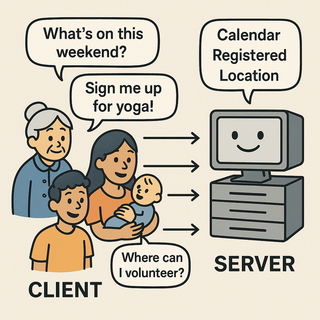 **The challenge:**
How do you set up a simple, reliable system that listens for online requests and responds with helpful information-so the community center can serve everyone efficiently and never lose a request again?
## 2. Learning Objectives
By the end of this tutorial, you will be able to:
- Understand what Express is and why it’s useful.
- Install Node.js and Express on your computer.
- Create and run a simple Express web server that responds to requests.
- Understand the basic parts of an Express app and how they work together.
## 3. Concept Introduction with Analogy
## **Analogy: The Digital Reception Desk**
Think of Express as the digital receptionist at the community center:
- When a neighbor walks in (makes a request), Express greets them and listens to what they need.
- If someone asks about upcoming events, Express checks the calendar and gives a list.
- If someone wants to sign up for a class, Express writes down their info and confirms their spot.
- Express never loses a note and always responds politely, making sure everyone feels heard.
## **What Is Express?**
- Express is a **lightweight web framework** for Node.js.
- It makes it easy to build web servers and APIs, so you can handle requests and send responses without a lot of boilerplate code.
- Express lets you define **routes** (URLs/endpoints) and **handlers** (functions that respond to requests).
## **Why Use Express?**
- Minimal and flexible: you only add what you need.
- Huge ecosystem and community support.
- Easy to learn, even for beginners.
- Used by companies and organizations of all sizes.
## **What is Node.js and Why Do You Need It?**
- **Node.js** is a runtime that lets you run JavaScript code outside the browser, on your computer or server.
- Express is a library that runs on Node.js to help you build web servers easily
## 5. Installation of Prerequisities
Let’s help Greenfield Community Center get online!
**Step 1: Install Node.js**
- Go to [nodejs.org](https://nodejs.org/)
- Download the **LTS (Long Term Support)** version for your operating system.
- Run the installer and follow the prompts.
- Install it on your computer.
- Open your terminal (Command Prompt, PowerShell, or Terminal app). and check installation:
```bash
node -v
npm -v
```
**Step 2: Initialize Your Project**
- Create a new folder for your project:
```bash
mkdir greenfield-center
cd greenfield-center
```
Initialize a Node.js project:
```bash
npm init -y
```
This creates a `package.json` file to track your project’s dependencies and settings.
**Step 3: Install Express**
- Install Express as a dependency:
```bash
npm install express
```
- This downloads Express and adds it to your project’s dependencies.
**What’s happening here?**
- `npm` (Node Package Manager) downloads Express and puts it in a folder called `node_modules`.
- The `package.json` file is updated so anyone can install the same dependencies with `npm install` in the future.
**Step 4: Create Your First Server**
- Create a file called `app.js` with the following code:
```typescript
const express = require('express');
const app = express();
const port = 3000;
// Route for the homepage
app.get('/', (req, res) => {
res.send('Welcome to Greenfield Community Center!');
});
// Start the server
app.listen(port, () => {
console.log(`Community Center server running at http://localhost:${port}`);
});
```
## 5. Step-by-Step Data Modeling & Code Walkthrough (Deep Dive)
Let’s see how each part of your Express setup directly solves the Greenfield Community Center’s problem.
**A. Creating the Express App**
Create a file called `app.js` in your project folder.
```typescript
const express = require('express');
const app = express();
const port = 3000;
```
**Explanation:**
- `require('express')` loads the Express library.
- `express()` creates an **application object** (`app`)-your digital receptionist.
- `port` is set to 3000, meaning your “front desk” will listen for visitors at `http://localhost:3000`.
**B. Defining Routes: How Express Listens and Responds**
```typescript
app.get('/', (req, res) => {
res.send('Welcome to Greenfield Community Center!');
});
```
**Explanation:**
- `app.get('/')` sets up a “route” for the homepage.
- When someone visits `http://localhost:3000/`, Express runs this function.
- `req` is the incoming request (what the visitor is asking for).
- `res` is the response object (how you reply).
- `res.send()` sends a plain text response back to the browser.
**How does this solve the center’s problem?**
- Every online visitor gets a friendly welcome message-no more lost or ignored requests.
**C. Adding More Routes: Serving Community Info**
```typescript
app.get('/events', (req, res) => {
const events = [
'Yoga Class - Monday 7pm',
'Gardening Workshop - Wednesday 5pm',
'Book Club - Friday 6pm'
];
res.json(events);
});
```
**Explanation:**
- This route listens for GET requests to `/events`.
- When someone visits `http://localhost:3000/events`, Express sends back a list of events as JSON (a common data format).
```typescript
- `res.json()` automatically sets the correct headers and formats the data.
```
**How does this help?**
- Neighbors can now check upcoming events anytime, without calling or writing notes.
**D. Starting the Server with `app.listen()`**
```typescript
app.listen(port, () => {
console.log(`Community Center server running at http://localhost:${port}`);
});
```
**What’s happening under the hood?**
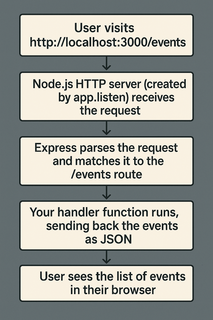
- `app.listen()` tells Node.js to start an HTTP server on the specified port.
- Express takes over as the “request handler” for this server.
- When a browser (or any client) connects to `localhost:3000`, Node.js hands the request to Express, which matches it to your routes and runs the right function.
- The callback in `app.listen()` runs once the server is ready, so you know when to start testing.
**How does this solve the center’s problem?**
- The community center is now “open for business” online-ready to greet every visitor and answer every request, 24/7.
**E. Running and Testing Your Server**
1. In your terminal, start the server:
```bash
`node app.js`
```
2. Open your browser and visit:
- `http://localhost:3000/` (should show your welcome message)
- `http://localhost:3000/events` (should show your events as a list)
**Troubleshooting tips:**
- If you get an error about the port being in use, try changing `const port = 3000;` to another number (like 3001).
- If you see “Cannot GET /something,” make sure you’ve defined a route for that path.
## **F. Visual Flow: How Express Handles Requests**
**The challenge:**
How do you set up a simple, reliable system that listens for online requests and responds with helpful information-so the community center can serve everyone efficiently and never lose a request again?
## 2. Learning Objectives
By the end of this tutorial, you will be able to:
- Understand what Express is and why it’s useful.
- Install Node.js and Express on your computer.
- Create and run a simple Express web server that responds to requests.
- Understand the basic parts of an Express app and how they work together.
## 3. Concept Introduction with Analogy
## **Analogy: The Digital Reception Desk**
Think of Express as the digital receptionist at the community center:
- When a neighbor walks in (makes a request), Express greets them and listens to what they need.
- If someone asks about upcoming events, Express checks the calendar and gives a list.
- If someone wants to sign up for a class, Express writes down their info and confirms their spot.
- Express never loses a note and always responds politely, making sure everyone feels heard.
## **What Is Express?**
- Express is a **lightweight web framework** for Node.js.
- It makes it easy to build web servers and APIs, so you can handle requests and send responses without a lot of boilerplate code.
- Express lets you define **routes** (URLs/endpoints) and **handlers** (functions that respond to requests).
## **Why Use Express?**
- Minimal and flexible: you only add what you need.
- Huge ecosystem and community support.
- Easy to learn, even for beginners.
- Used by companies and organizations of all sizes.
## **What is Node.js and Why Do You Need It?**
- **Node.js** is a runtime that lets you run JavaScript code outside the browser, on your computer or server.
- Express is a library that runs on Node.js to help you build web servers easily
## 5. Installation of Prerequisities
Let’s help Greenfield Community Center get online!
**Step 1: Install Node.js**
- Go to [nodejs.org](https://nodejs.org/)
- Download the **LTS (Long Term Support)** version for your operating system.
- Run the installer and follow the prompts.
- Install it on your computer.
- Open your terminal (Command Prompt, PowerShell, or Terminal app). and check installation:
```bash
node -v
npm -v
```
**Step 2: Initialize Your Project**
- Create a new folder for your project:
```bash
mkdir greenfield-center
cd greenfield-center
```
Initialize a Node.js project:
```bash
npm init -y
```
This creates a `package.json` file to track your project’s dependencies and settings.
**Step 3: Install Express**
- Install Express as a dependency:
```bash
npm install express
```
- This downloads Express and adds it to your project’s dependencies.
**What’s happening here?**
- `npm` (Node Package Manager) downloads Express and puts it in a folder called `node_modules`.
- The `package.json` file is updated so anyone can install the same dependencies with `npm install` in the future.
**Step 4: Create Your First Server**
- Create a file called `app.js` with the following code:
```typescript
const express = require('express');
const app = express();
const port = 3000;
// Route for the homepage
app.get('/', (req, res) => {
res.send('Welcome to Greenfield Community Center!');
});
// Start the server
app.listen(port, () => {
console.log(`Community Center server running at http://localhost:${port}`);
});
```
## 5. Step-by-Step Data Modeling & Code Walkthrough (Deep Dive)
Let’s see how each part of your Express setup directly solves the Greenfield Community Center’s problem.
**A. Creating the Express App**
Create a file called `app.js` in your project folder.
```typescript
const express = require('express');
const app = express();
const port = 3000;
```
**Explanation:**
- `require('express')` loads the Express library.
- `express()` creates an **application object** (`app`)-your digital receptionist.
- `port` is set to 3000, meaning your “front desk” will listen for visitors at `http://localhost:3000`.
**B. Defining Routes: How Express Listens and Responds**
```typescript
app.get('/', (req, res) => {
res.send('Welcome to Greenfield Community Center!');
});
```
**Explanation:**
- `app.get('/')` sets up a “route” for the homepage.
- When someone visits `http://localhost:3000/`, Express runs this function.
- `req` is the incoming request (what the visitor is asking for).
- `res` is the response object (how you reply).
- `res.send()` sends a plain text response back to the browser.
**How does this solve the center’s problem?**
- Every online visitor gets a friendly welcome message-no more lost or ignored requests.
**C. Adding More Routes: Serving Community Info**
```typescript
app.get('/events', (req, res) => {
const events = [
'Yoga Class - Monday 7pm',
'Gardening Workshop - Wednesday 5pm',
'Book Club - Friday 6pm'
];
res.json(events);
});
```
**Explanation:**
- This route listens for GET requests to `/events`.
- When someone visits `http://localhost:3000/events`, Express sends back a list of events as JSON (a common data format).
```typescript
- `res.json()` automatically sets the correct headers and formats the data.
```
**How does this help?**
- Neighbors can now check upcoming events anytime, without calling or writing notes.
**D. Starting the Server with `app.listen()`**
```typescript
app.listen(port, () => {
console.log(`Community Center server running at http://localhost:${port}`);
});
```
**What’s happening under the hood?**
- `app.listen()` tells Node.js to start an HTTP server on the specified port.
- Express takes over as the “request handler” for this server.
- When a browser (or any client) connects to `localhost:3000`, Node.js hands the request to Express, which matches it to your routes and runs the right function.
- The callback in `app.listen()` runs once the server is ready, so you know when to start testing.
**How does this solve the center’s problem?**
- The community center is now “open for business” online-ready to greet every visitor and answer every request, 24/7.
**E. Running and Testing Your Server**
1. In your terminal, start the server:
```bash
`node app.js`
```
2. Open your browser and visit:
- `http://localhost:3000/` (should show your welcome message)
- `http://localhost:3000/events` (should show your events as a list)
**Troubleshooting tips:**
- If you get an error about the port being in use, try changing `const port = 3000;` to another number (like 3001).
- If you see “Cannot GET /something,” make sure you’ve defined a route for that path.
## **F. Visual Flow: How Express Handles Requests**
 ## **G. How This Setup Directly Solves the Community Center’s Needs**
- **No more lost notes:** Every request is logged and answered automatically.
- **Always available:** The server runs day and night, so neighbors can get info anytime.
- **Easy to expand:** Adding new features (like `/classes` or `/contact`) is as simple as adding new routes.
## 6.Challenge
**Your Turn!**
- Add a new route `/contact` that returns the center’s contact email and phone as a JSON object.
- Test it by visiting `http://localhost:3000/contact`.
## 7. Common Pitfalls & Best Practices
| Pitfall | Best Practice |
|---------------------------------|-------------------------------------------------|
| Forgetting to run node app.js | Always run your server to test changes |
| Using wrong HTTP methods | Use GET for reading, POST for creating |
| Not installing dependencies | Run npm install before running code |
| Hardcoding ports | Use environment variables for flexibility |
## 8. Quick Recap & Key Takeaways
- You installed Node.js and Express, and created your first server.
- Express routes map URLs to responses, letting you serve content or data.
- `app.listen()` starts your server, making it available to anyone who visits.
- This setup is the digital “front desk” for your community center-always open, always organized.
## 9. Optional: Programmer’s Workflow Checklist
- Install Node.js and npm.
- Initialize project with `npm init -y`.
- Install Express with `npm install express`.
- Create `app.js` and define routes.
- Run your server and test routes in a browser.
- Add new routes as your needs grow.
## **G. How This Setup Directly Solves the Community Center’s Needs**
- **No more lost notes:** Every request is logged and answered automatically.
- **Always available:** The server runs day and night, so neighbors can get info anytime.
- **Easy to expand:** Adding new features (like `/classes` or `/contact`) is as simple as adding new routes.
## 6.Challenge
**Your Turn!**
- Add a new route `/contact` that returns the center’s contact email and phone as a JSON object.
- Test it by visiting `http://localhost:3000/contact`.
## 7. Common Pitfalls & Best Practices
| Pitfall | Best Practice |
|---------------------------------|-------------------------------------------------|
| Forgetting to run node app.js | Always run your server to test changes |
| Using wrong HTTP methods | Use GET for reading, POST for creating |
| Not installing dependencies | Run npm install before running code |
| Hardcoding ports | Use environment variables for flexibility |
## 8. Quick Recap & Key Takeaways
- You installed Node.js and Express, and created your first server.
- Express routes map URLs to responses, letting you serve content or data.
- `app.listen()` starts your server, making it available to anyone who visits.
- This setup is the digital “front desk” for your community center-always open, always organized.
## 9. Optional: Programmer’s Workflow Checklist
- Install Node.js and npm.
- Initialize project with `npm init -y`.
- Install Express with `npm install express`.
- Create `app.js` and define routes.
- Run your server and test routes in a browser.
- Add new routes as your needs grow.